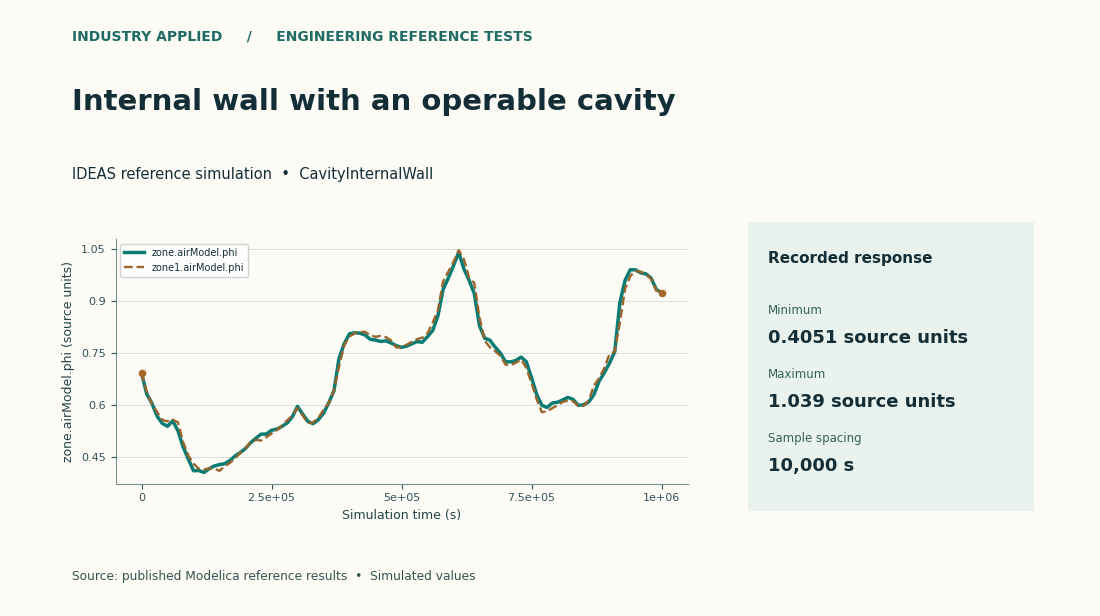
The largest absolute separation between zone.airModel.phi and zone1.airModel.phi is 0.058095, at a saved time of 920,000 s. At that checkpoint the two values are 0.89471 and 0.83661, respectively. This is a comparison between the named channels under the published test conditions.
The system being tested
The KU Leuven IDEAS project publishes the IDEAS test named CavityInternalWall. The source file places it under Buildings, Components. We used the 101 stored values for zone.airModel.phi over the interval 0 to 1,000,000 seconds. This is a simulated test with specified inputs and boundaries.
The reference file contains 4 recorded variables. Alongside the primary output there are zone1.TSensor, zone.TSensor, zone.airModel.phi, zone1.airModel.phi. The source and the export are linked independently below so that each reading can be traced back to its calculated channel.
Compare the recorded channels
At 920,000 s, zone.airModel.phi is 0.89471 and zone1.airModel.phi is 0.83661. Subtracting the second value from the first gives 0.058095. This is their largest recorded absolute separation. A difference between an inlet and an outlet, or between a command and a response, need not be a measurement error.
Reproduce the calculation
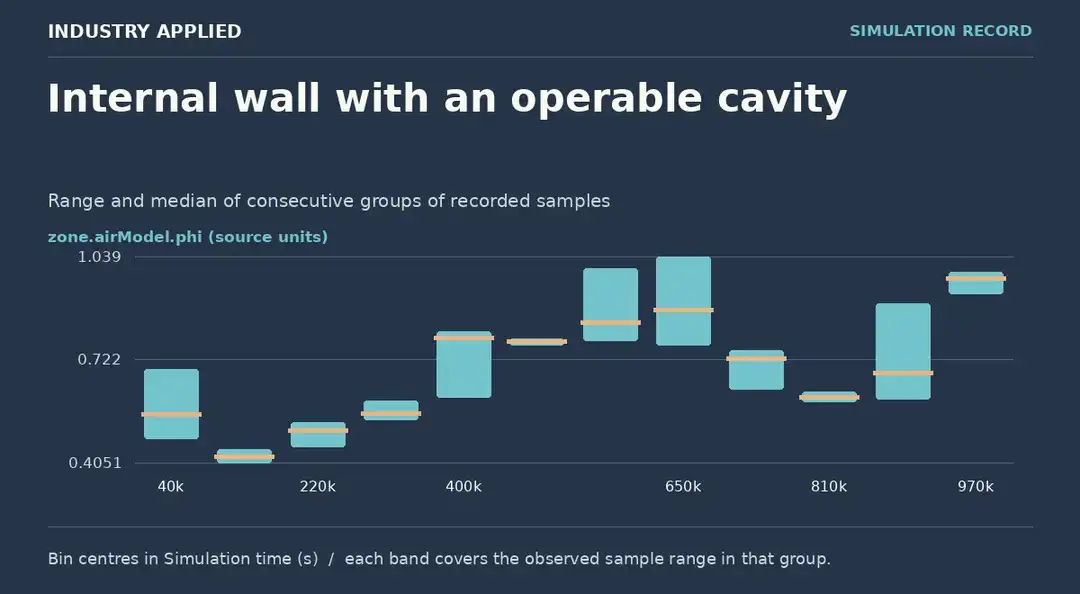
The largest absolute change between consecutive stored points appears from 910,000 to 920,000 seconds. Subtracting 0.7529 from 0.8947 gives 0.1418 source units. Its location brackets the change within one saved interval of 10,000 seconds. It does not identify an unobserved instantaneous peak or the exact crossing time.
The worked table retains the first and last points, the primary maximum and minimum, the largest adjacent change and a spread of checkpoints across the run. Rounding is for presentation. Use the full linked reference series to repeat integrals or compare events between checkpoints. The archived sampling interval need not match the simulation solver’s internal step.
Worked data
Simulation time (s) | zone.airModel.phi (dimensionless) | zone1.airModel.phi (dimensionless) |
|---|---|---|
0 | 0.6919742 | 0.6919742 |
120000 | 0.4050814 | 0.4133883 |
200000 | 0.4745094 | 0.4753816 |
400000 | 0.8046963 | 0.7966607 |
600000 | 1.001305 | 1.011667 |
610000 | 1.038967 | 1.045714 |
800000 | 0.6073769 | 0.5987658 |
910000 | 0.7529024 | 0.7531227 |
920000 | 0.8947074 | 0.8366125 |
1000000 | 0.9232258 | 0.9290851 |
What to check on site
Keep the occupied schedule, weather boundary and zone definition with the result. A change in a simulated room condition can reflect the boundary assumptions as well as the component under study. Compare occupied periods and maintain the same observation location.
State the operating duty, measurement location and expected tolerance before evaluating a local trend. Re-run the comparison with the installed controls and instruments during a representative operating period. Retain the native units and the raw export so that a later change in software or presentation can be investigated.
Units in the source model
The component declarations identify the scale of the exported variables. In this run, zone.airModel.phi uses dimensionless and zone1.airModel.phi uses dimensionless. Keep the exact channel name and unit together when exporting data to a historian. Read the component definition.
Data and source model
Published model and component definitions. Numerical reference series. Simulation and plot commands. Download the worked checkpoints in CSV format.